The short answer
Phones with Dual Apps or app cloning (Xiaomi, Samsung, Oppo, Vivo) send every Instagram link to an app, so the permission screen never opens in your browser. Connecting with Facebook: pick the Instagram without the small badge. Connecting with Instagram: tap Cancel, use the copy-link option, and paste the link into your browser's address bar. Or connect on a computer.
Step by step
1You see Select app with two Instagrams
The one with the small badge on its icon is the clone. Neither app shows the permission screen a scheduler needs; that screen only opens in a browser.
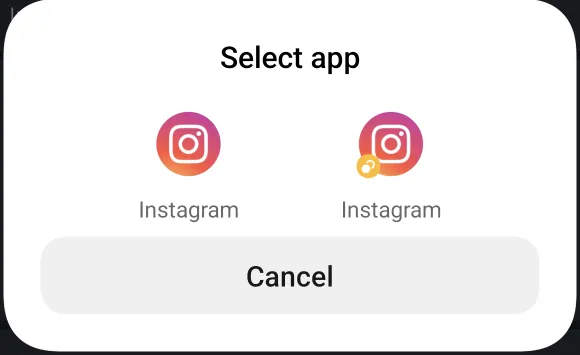
2Connecting with Facebook? Pick the Instagram without the badge
On our test phone the main Instagram app handed the link straight back to the browser, and the Facebook sign-in and permission screens continued there.
3Connecting with Instagram? Tap Cancel and use a link you paste
Back in snazzy, tap "Phone only offers the Instagram app, or opens the wrong one? Use a link you paste instead". It shows the sign-in link as text.
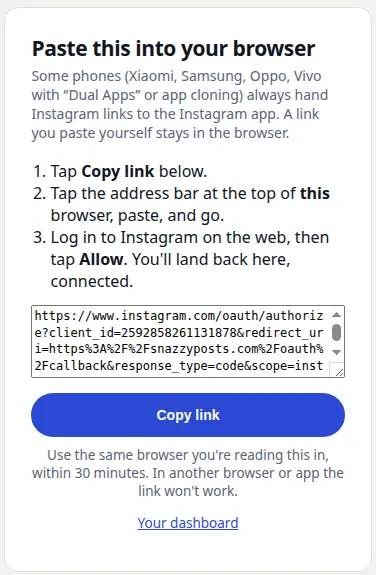
4Paste it into the address bar
Tap Copy link, tap the address bar of the same browser, paste and go. A link you type or paste yourself stays in the browser. Log in to Instagram on the web and tap Allow; you land back in snazzy, connected.
What catches people out
- Use the same browser you copied the link in, within 30 minutes. In another browser the link fails our security check.
- Tapping Cancel on the chooser just returns you to the browser page you were on. Nothing is lost.
- Easiest of all: connect once on a computer. Scheduling then works from any device.
Related guides
Last checked 2026-11-09. Instagram changes its API without notice — if something here is wrong, tell us and we will fix it.
Schedule once. We post it.
Reels, Stories, carousels and comment-to-DM on Instagram. Free forever, no card.
Start free